
If you want to extend the battery life of your wireless earbuds, you are not alone. You charge your earbuds every night, but two days later, they die halfway through a phone call. Sound familiar? Most people blame the brand, but the real problem is usually charging habits, not the hardware…
Wireless earbuds run on small lithium-ion cells, and those cells respond to how you treat them. Charge them the wrong way for a year and you lose hours of daily playtime. Charge them the right way and the same pair still holds a strong charge long after the warranty ends.
This guide walks through what drains earbud batteries, the exact habits that protect them, and what to do once the battery starts to fade for good.
Why Wireless Earbuds Lose Battery Life So Fast
Wireless earbuds run on lithium-ion batteries, the same technology used in phones and laptops. These cells are small by design, since the earbuds themselves are tiny, and small cells hold less energy to begin with. That’s why most earbuds list playtime in hours, not days.
Every battery has a limited number of charge cycles. A cycle counts as one full drain from 100% to 0%, whether it happens in one session or across several partial top-ups. Most earbud batteries handle 300 to 500 cycles before the capacity drops in a way you notice. After that point, the earbuds still work, but they hold less charge and need more frequent trips back to the case.
Three factors speed up that decline:
- Heat, especially from direct sunlight or a hot car
- Repeated full discharges down to 0%
- Long periods sitting at 100% while plugged in
None of these factors are unusual. They happen during a normal week. That’s the reason battery habits matter more than the brand or price of the earbuds.
A Familiar Scenario
Picture a regular commute. You leave the house with earbuds at 100%, sit through a 40-minute train ride, work with them in during calls, then head home with them still in. By the time you’re back, the case shows one bar left. Overnight, you plug the case in and let it sit on the charger until morning, every single night.
Six months into that routine, the same pair that used to last a full day now needs a top-up by lunchtime. The battery didn’t break. It aged faster because it spent hours every night at full charge and dropped to empty most days. Small changes to that same routine, covered in the next section, slow that aging down without changing how you use the earbuds day to day.
Step-by-Step Ways to Extend the Battery Life of Your Wireless Earbuds
1. Keep the Charge Between 20% and 80%
Lithium-ion batteries handle partial charges better than full ones. Letting the earbuds sit at 0% or 100% for long stretches puts stress on the cell. Aim to recharge once the case drops to around 20-30%, and unplug once it hits 80-90% when you have the option. Frequent short top-ups do less damage than one long charge from empty to full, according to Anker Soundcore’s charging guide.
2. Keep Heat and Cold Away From the Case
Heat is the fastest way to age a lithium battery. Leaving the case on a car dashboard, next to a window, or in direct sun for an hour does more damage than months of normal use. Cold temperatures slow the battery down too, though the effect reverses once the case warms back up. Store the case at room temperature and keep it out of your pocket next to your phone on a hot day.
3. Lower the Volume When You Can
Higher volume asks the driver inside each earbud to work harder, which pulls more power per minute. Dropping the volume by even 10-15% during long listening sessions adds meaningful playtime across a full day, especially on commutes or during workouts.
4. Turn Off Active Noise Cancellation When You Don’t Need It
ANC uses microphones and a processor running constantly to cancel outside sound. That processing draws steady power in the background. Switch to transparency mode or ANC off during quiet moments, like at a desk or at home, and save the feature for places that actually need it, like a train platform or a flight.
5. Always Return Earbuds to the Case Between Uses
Leaving one earbud out of the case, even for a short break, keeps it connected to your phone and searching for signal. That connection drains the battery quietly. Get in the habit of dropping both earbuds back into the case the moment you stop listening, even for a five-minute break.
6. Install Firmware Updates
Manufacturers push firmware updates that improve Bluetooth connection efficiency and fix power drain bugs. Check your earbuds’ companion app every few weeks for pending updates. A single update sometimes adds back 20-30 minutes of daily playtime on earbuds that felt like they had degraded.
7. Clean the Charging Contacts Regularly
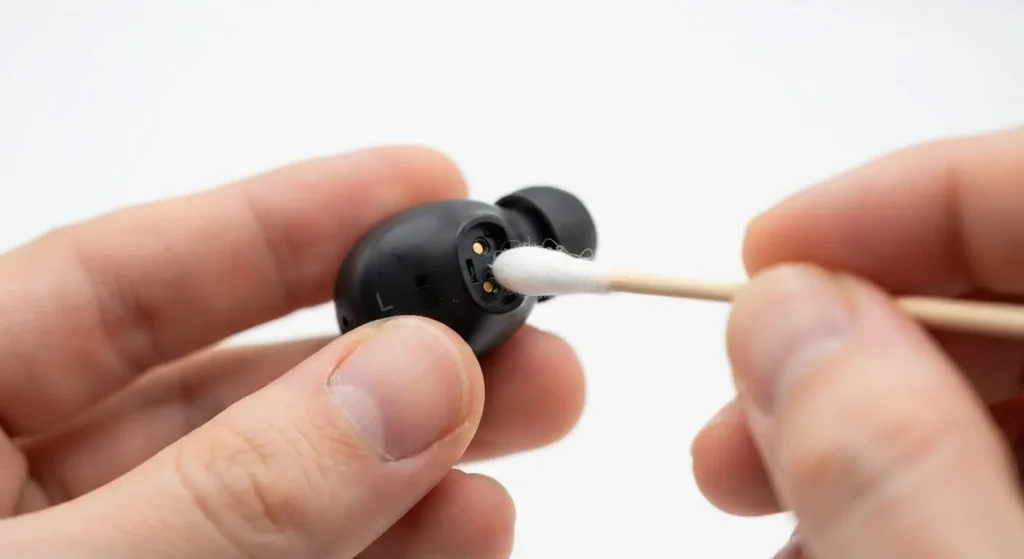
Earwax, dust, and pocket lint build up on the metal charging pins inside the case and on the earbuds. A dirty contact breaks the connection during charging, so the earbuds sit in the case overnight without actually charging. Wipe both surfaces with a dry cotton swab or a soft, dry cloth once a week.
8. Use a Certified Charger and Cable
A charger with the wrong voltage or a damaged cable delivers inconsistent power, which stresses the battery over time. Stick to the cable that shipped with the earbuds or a certified replacement from the same brand. Skip unbranded, unusually cheap chargers, since they rarely regulate voltage correctly.
9. Avoid Overnight Charging Every Single Night
Modern charging cases include a chip that stops the flow once the battery hits 100%, so overnight charging won’t cause a fire or immediate damage. Still, sitting at full charge for six to eight hours every night adds up over a year. Charge during the day when you’re around to unplug once the case hits 80-90%, and save overnight charging for nights when the case is genuinely low.
10. Store at Around 50% for Long-Term Storage
Planning to leave a pair of earbuds unused for a month or longer, like a backup pair or an old model? Charge the case to roughly 50% before putting it away, not 0% or 100%. A battery stored at full or empty charge for weeks loses capacity faster than one stored at a moderate level.
How Long Should Wireless Earbud Batteries Actually Last
With normal daily use and the habits above, most wireless earbuds keep usable battery health for two to four years. Heavy daily use, frequent full discharges, and regular heat exposure push that number down toward the one to two year mark instead.
Once a pair passes its rated charge cycle count, expect the daily playtime to drop by 20% or more compared to when the earbuds were new. That drop is a normal part of lithium battery chemistry, not a sign of a defective product, and it applies to phones and laptops the same way, as Apple’s official battery guide explains.
Signs Your Earbud Battery Is Wearing Out
Watch for these signals:
- Playtime drops noticeably compared to when you bought the earbuds
- The case shows a full charge but the earbuds die within an hour
- One earbud drains faster than the other
- The earbuds shut off suddenly instead of warning you first
- Charging takes longer than it used to for the same amount of playtime
One or two of these on their own aren’t unusual after heavy use. Several appearing together, especially within the same month, points to a battery nearing the end of its lifespan rather than a software glitch.

Frequently Asked Questions
Is it bad to charge wireless earbuds every night? Charging every night isn’t harmful on its own, since modern cases stop the flow at 100%. The wear comes from sitting at full charge for hours at a time, night after night. Unplugging once the case reaches 80-90% when possible reduces that wear.
Do wireless earbuds have a memory effect like old batteries? No. Lithium-ion batteries, the type used in almost all wireless earbuds, don’t suffer from the memory effect that affected older nickel-based batteries. You don’t need to fully drain them before recharging, and doing so regularly actually shortens their lifespan.
Why does one earbud die faster than the other? This usually points to uneven wear from one earbud spending more time out of the case, a dirty charging contact on one side, or a manufacturing variance between the two cells. Clean both contacts first, and if the gap continues, contact the manufacturer’s support team.
Does Active Noise Cancellation really drain the battery that fast? Yes. ANC runs microphones and a processor continuously to cancel outside noise, which pulls noticeably more power than standard playback. Manufacturers list separate playtime figures for ANC on and off, and the gap often reaches one to two hours per charge.
Can a wireless earbud battery be replaced? On most consumer models, no. The batteries are sealed inside the earbuds and the case, so a full battery swap usually isn’t offered by the manufacturer. Some brands run trade-in or battery replacement programs, so check the official support page for your specific model before assuming a replacement isn’t available.
How do I know if my earbuds are still under warranty for a battery issue? Check the purchase date against the manufacturer’s stated warranty period, typically one year, then contact their support team directly with the serial number. Battery capacity below a certain threshold sometimes qualifies for a replacement under warranty, depending on the brand’s policy.
Getting the Most Out of Every Charge
Wireless earbud batteries wear down on a schedule set by chemistry, not by luck. Heat, full discharges, and long stretches at 100% speed that schedule up. Partial charging, a clean case, moderate volume, and a bit of care around ANC slow it down. None of these habits ask you to change how you listen, only when and how you plug in.
Small adjustments this week protect the playtime you’ll still have a year from now.
Make sure to Extend the Battery Life of Your Wireless Earbuds